Which goals are available in Google Analytics? None
 My short answer
Which goals are available in Google Analytics? None. Goals belonged to Universal Analytics, which stopped processing hits on 1 July 2023. GA4 uses key events instead: you star an event in Admin, and it counts from then on. A standard property allows 30 key events, and Analytics 360 allows 50.
If you’re asking which goals are available in Google Analytics, the short answer is none.
Goals were a Universal Analytics feature, and Universal Analytics stopped collecting data in July 2023. You can’t create goals in Google Analytics anymore. GA4 replaced them with key events.
That’s the bad news. The good news is the GA4 version is simpler, once you know where Google moved everything.
Most pages that still answer which goals are available in Google Analytics describe a product that’s been switched off for over 3 years. If a post tells you to open Admin and create a destination goal, close the tab.
Which goals are available in Google Analytics in 2026
None. Google Analytics goals lived in Universal Analytics, and standard Universal Analytics properties stopped processing hits on 1 July 2023. GA4, the only Google Analytics you can use today, has no goals. It has events, and you mark the important ones as key events: up to 30 on a standard property, 50 on Analytics 360.
Here’s how it went, from Google’s Universal Analytics shutdown page and its own announcements:
- 1 July 2023: standard Universal Analytics properties stopped processing hits. Analytics 360 customers with a current order got a 1 year extension.
- 21 March 2024: Google renamed GA4 conversions to key events, so the word conversion means the same thing in Analytics and Google Ads.
- 1 July 2024: access to the Universal Analytics interface and API ended, 360 included.
That timeline settles which goals are available in Google Analytics for good.
GA4 isn’t a renamed Universal Analytics. The old one counted sessions and pageviews, then let you flag some of them as goals. GA4 counts events. A page view is an event. A scroll is an event. A purchase is an event.
So there are no Google Analytics 4 goals as a separate thing, only a star next to an event you already collect. People still say GA4 goals. They mean key events.
That sounds like a small change. It isn’t. It moved the work from the reporting screen into the tags, which is why so many accounts came out of the migration with numbers nobody trusted.
Universal Analytics: a goal object
- Built in the reporting view, not the tags
- 4 types: destination, duration, pages, event
- 20 per view, and never deletable
- Stopped processing hits on 1 July 2023
GA4: a key event flag
- Built on an event you already collect
- 1 type: an event, marked with a star
- 30 per standard property, 50 on 360
- Counts forward only, never backfills
Google Analytics goals: the 4 types (plus Smart Goals)
Google Analytics goals came in 4 types: destination, duration, pages or screens per session, and event. Each one turned a session into a completion when a rule matched. If you’re wondering which are examples of goals in Google Analytics, think thank you pages, long visits, deep visits and button clicks.
Here’s what each one did:
- Destination: a page loads, like /thank-you after a form. You matched the URL with Equals to, Begins with or a regular expression. It was the only type that could carry a funnel.
- Duration: a session lasts a set time or longer, say 5 minutes.
- Pages/Screens per session: a visitor sees a set number of pages, say 4.
- Event: a tracked event matches the conditions you set, like a video play or a PDF download.
- Smart Goals: not really a 5th type. Analytics scored every visit and counted the best ones as conversions, for Google Ads accounts without enough real conversions to bid on. Nobody I know misses them.
The rules around them shaped how agencies worked:
- 20 per reporting view, in sets of 5.
- No deleting. You could stop a goal recording, not remove it. Slots got burned on tests in month 1, and the view ran out of room by month 6.
- Not retroactive. A goal counted from the day you created it. GA4 key events work the same way, and it’s still the mistake people make the week after a launch.
The Google Analytics goal funnel went with them. The nearest thing now is a funnel exploration in Explore, which takes up to 10 steps and doesn’t need a goal at all.
Google Analytics goals vs events in GA4
In Universal Analytics a goal was a rule that sat on top of your data. In GA4 the event is the data, and a key event is just an event you’ve starred. So the mapping is uneven: 1 goal type moves across exactly, 1 needs some setup, and 2 have nothing to move to.
| Universal Analytics goal | What it did | GA4 equivalent | How close |
|---|---|---|---|
| Event | Fired when a tracked event matched | Mark that event as a key event | Exact |
| Destination | Fired on a specific URL | New event built from page_view plus a page_location condition | Close, more setup |
| Duration | Fired past a session length | Nothing. Engagement time is a metric you read, not a trigger | Poor |
| Pages or screens per session | Fired on a page count | Nothing. Engaged sessions is the nearest metric | Poor |
| Smart Goals | Guessed a valuable session | Removed | Gone |
That’s 2 out of 5 that make it across. Not a great score for the question of which goals are available in Google Analytics.
An engaged session in GA4 lasts longer than 10 seconds, has a key event, or has at least 2 page or screen views. It’s a number you read in a report. You can’t trigger anything from it.
So if a duration goal was quietly feeding a Google Ads bid strategy, that signal stopped in July 2023. The bidding carried on anyway.
2 old reports changed names too:
- Goal completions: Universal Analytics counted a goal once per session. GA4 counts a key event every time it fires, unless you switch it to once per session. Key events made from old goals were set to once per session by default.
- Goal conversion rate: the old Google Analytics goal conversion rate is now session key event rate, the percentage of sessions with any key event. User key event rate does the same per user.
Setting up goals in GA4, step by step
Setting up goals in GA4 means marking an event as a key event. Go to Admin, then Events under Data display, find the event and click the star next to it. It shows in standard reports within 24 hours and counts from that moment on, never backwards.
If you came here for how to set up goals in Google Analytics, this is the version that works today.
If the event already fires:
- Open Admin, then Events under Data display.
- Find the event in the Recent events tab.
- Click the star next to it.
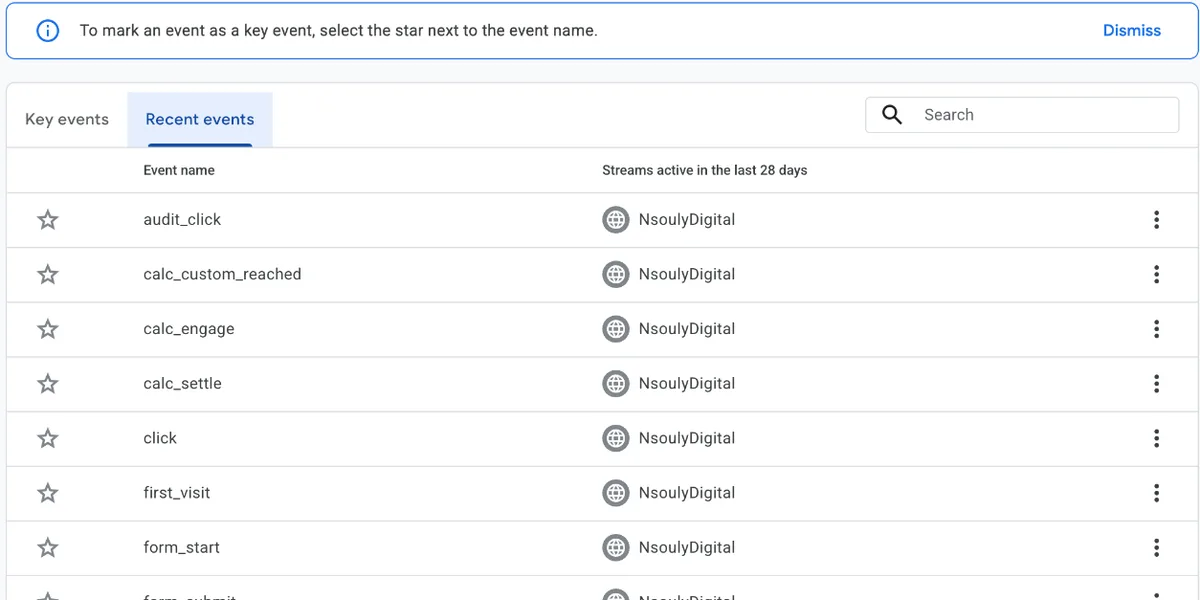
That’s it. Setting up goals in Google Analytics used to take a whole configuration screen. Now it’s a star.
If it doesn’t fire yet, say a thank you page that used to be a destination goal, build the event first:
- In Admin, open Events, click Create event, pick the data stream, then Create.
- Name it. Google suggests a recommended name where one fits, like
generate_leadfor a contact form. - Add 2 matching conditions:
event_nameequalspage_view, andpage_locationequals your thank you page URL. - Click Create, then mark the new name as a key event straight away, so it counts from the first visit.
Created events take an hour or more to start working, you get 50 per property, and they never apply to past data. Don’t star page_view itself, or every page view becomes a key event. Google’s destination goals guide covers the same steps.
The clicks take 2 minutes. The decisions around them take longer:
- Name it before you build it. A property full of
submit_1,submit_newandsubmit_finalis unreadable within a quarter. - Build it in your tag manager where you can. Create event inside GA4 is handy and limited. Anything that needs a value, a currency or a deduplication ID belongs in the tags.
- Wait a day. Standard reports can take 24 hours, and marking an event on Tuesday doesn’t backfill Monday.
- Check it against the platform, not against itself. GA4 says 40 purchases and Shopify says 31. The one attached to money is right.
Google’s own pages on marking events as key events and the configuration limits are worth reading directly. They’re short, and they stay current.
3 or 4 key events is enough for almost any account: a purchase or a qualified lead, an add to cart or a form start, and 1 signal further up. That’s the real answer to which goals are available in Google Analytics now: whichever events you star. Everything else is a report, not a decision.
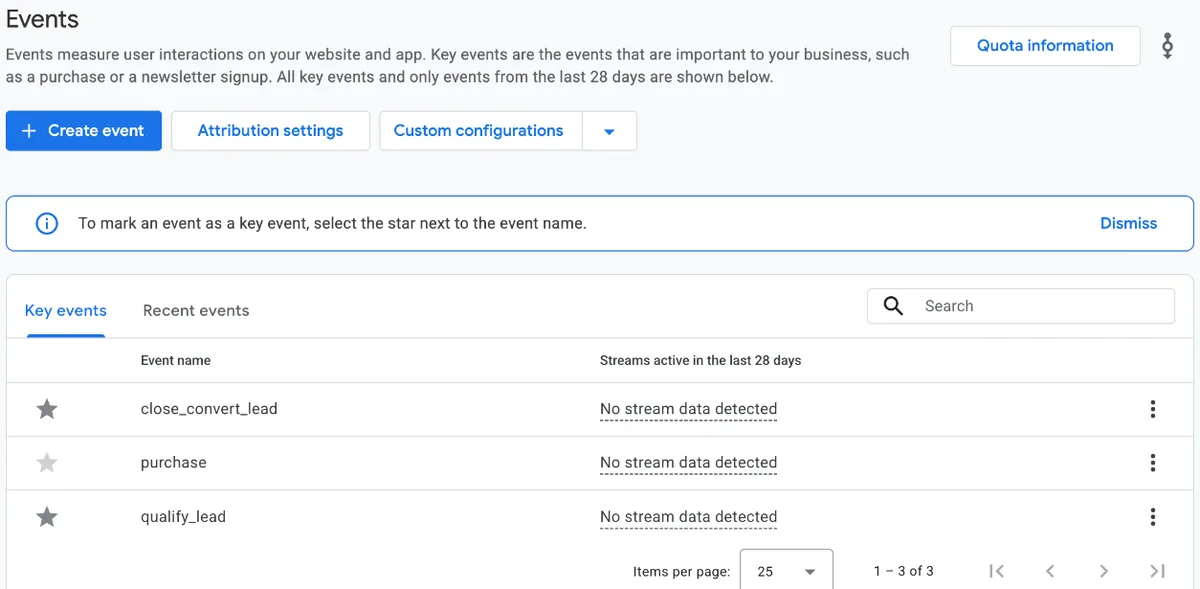
The goals with no GA4 equivalent
Duration goals and pages per session goals have no GA4 equivalent, because GA4 triggers on events, not on the shape of a session. Smart Goals were removed outright. If any of those 3 fed a bid strategy, that signal ended when Universal Analytics stopped processing data in July 2023.
If you’re auditing which goals are available in Google Analytics on an old account, start with these 3.
You can fake a duration goal. A timer trigger in Google Tag Manager fires a custom event at 60 seconds, you mark it, and now you’ve got something that looks like one. I’ve built it for clients who insisted.
I still wouldn’t bid on it. Time on page rewards confusion as much as interest, and an algorithm chasing it will find you the cheapest people who scroll slowly.
Need a signal near the top of the funnel? Pick something a person chose to do:
- a video watched to the end
- a size guide opened
- a store locator used
The goal was never the measurement anyway. It was a label on a session. What decides whether your reporting is any good is the advertising tracking underneath it, and whether the event reaches the ad platform at all.
What I’d do
I treat the question of which goals are available in Google Analytics as settled, and build the measurement around the ad platforms instead. GA4 gets 3 or 4 key events that matter. The platform pixels and server side events carry the bidding signal. The 2 sets of numbers get reconciled once a week, not argued about every morning.
That order matters. GA4 is a reporting tool now, not the source of truth for bidding.
Meta optimises on what Meta receives. Google optimises on what Google receives. A perfect GA4 property on top of a broken Conversions API setup still wastes your budget, just with cleaner dashboards.
If GA4 itself is the wrong tool, I’ve covered the Google Analytics alternatives I’d use. Most accounts don’t need one. They need 3 events that fire reliably.
So which goals are available in Google Analytics on your account? The key events you pick, and nothing more.
Not sure your old goals ever got rebuilt properly? Talk to me.
Questions people actually ask
Which goals are available in Google Analytics today?
None. Goals were a Universal Analytics feature, and standard Universal Analytics properties stopped processing hits on 1 July 2023. GA4 has no goals. It collects events, and you mark the important ones as key events. A standard property allows 30 key events and an Analytics 360 property allows 50.
Which are goal types in Google Analytics, with examples?
Universal Analytics had 4: destination (a thank you page loads), duration (a session lasts 5 minutes or more), pages or screens per session (a visitor sees 4 pages) and event (a video play or a download). Smart Goals scored visits for Google Ads accounts. None of them exist in GA4, which uses key events instead.
When creating a goal in Google Analytics, which are required?
In Universal Analytics you chose a goal type, from a template or Custom, then filled in that type's details: the URL for a destination goal, the hours, minutes and seconds for a duration goal, the conditions for an event goal. A value and a funnel were optional. In GA4 there's no goal form. You star an event you already collect.
How do I recreate a destination goal in GA4?
In Admin, open Events, then Create event. Build a new event from page_view with a condition on page_location matching your thank you page URL. Save it, then mark the new event as a key event. It counts from the moment you create it, never retroactively, so build it before the campaign launches, not after.
Is a key event the same as a conversion?
Not anymore. In March 2024 Google renamed GA4 conversions to key events, so that conversion means the same thing in Analytics and Google Ads. A conversion is now something you create in Google Ads from a key event, to bid on. The 2 numbers still won't match exactly, because the attribution windows and models differ.
How many key events can a GA4 property have?
30 on a standard property and 50 on Analytics 360, according to Google's own configuration limits. Universal Analytics allowed 20 goals per reporting view. In practice most accounts need 3 or 4 real key events, and the properties that hit the limit are usually counting things nobody makes a decision from.